In less than 120 seconds, you will learn exactly what types of audio you can use for your videos, including the critical distinction between personal and commercial libraries that most creators miss.
Quick Answer: TikTok provides two primary audio sources: the General Music Library for personal accounts and the Commercial Music Library (CML) for business accounts. Users can also access Original Sounds from other creators and curated Trending Sounds. TikTok does not transfer copyright ownership to users when they select music from its library.
When This Search Doesn’t Work
If you cannot find a specific mainstream track, it usually means your account is set to “Business.” Business profiles are system-locked to pre-cleared commercial tracks to prevent legal disputes.
Categories of Music on TikTok
TikTok organizes its audio ecosystem into distinct entities to ensure platform compliance:
- Commercial Music Library (CML): Over 1.3 million tracks pre-cleared for brand promotion and advertisements.
- General Music Library: Mainstream hits from major record labels, accessible only to personal accounts for non-promotional content.
- Original Sounds: Unique audio clips uploaded by users, including voiceovers and custom remixes.
- Trending Sounds: Dynamic clips gaining high engagement across the For You Page (FYP).
How to Access Available Music (UI Path)
To find and use authorized audio, follow this exact path in the 2026 interface:
Create (+) → Add sound → Search → Commercial sounds (for business accounts)
- Open the TikTok app and tap the Plus (+) button.
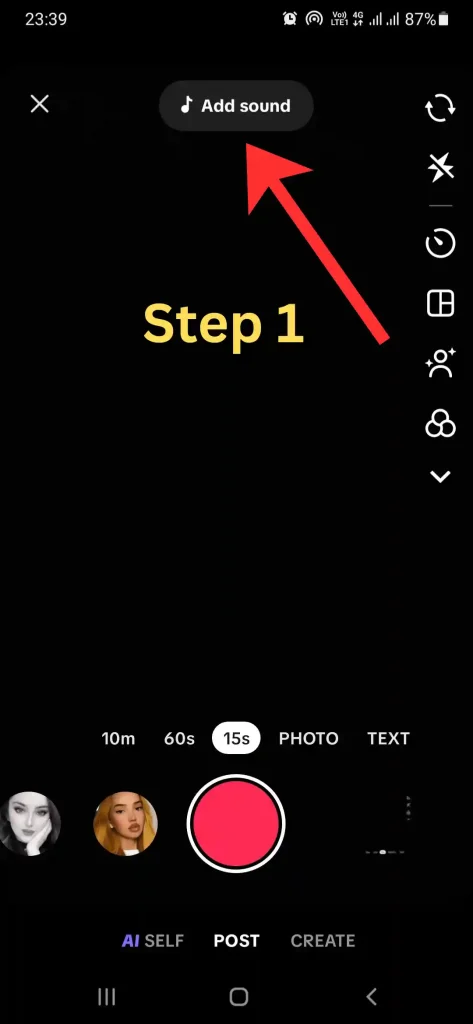
- Select Add sound at the top of the recording screen.
- Browse through the Discover tab or curated playlists.
- Use the Search bar to find specific artists or genres.
Important Limitation (Most Users Miss This)
- ⚠️ Account-Type Restrictions: Business accounts cannot use most mainstream pop songs due to licensing limitations.
- ⚠️ Regional Availability: Some tracks are restricted to specific geographic regions based on label agreements.
- ⚠️ Automatic Muting: TikTok’s detection systems automatically mute videos that use unlicensed music for commercial purposes.
What Music Access Does NOT Control
- Audio Quality: Accessing a popular track does not automatically improve the bit-rate or technical resolution of your video.
- Guaranteed Reach: Using a trending song does not ensure viral growth, though it may align with current visibility patterns.
- External Usage: Music licensed for TikTok cannot typically be used in the same video when shared on other platforms like YouTube.
Quick Decision Guide
| User Type | Recommended Library | Access to Pop Hits? |
| ✅ Content Creator | General Library | Yes |
| ✅ Registered Brand | Commercial Library | No |
| ✅ Casual Viewer | General Library | Yes |
Most creators only need the General Music Library unless they are running ads.
Frequently Asked Questions
Why is a song I used before now missing?
TikTok regularly updates its licensing agreements. If a label removes its catalog, the song becomes unavailable for new videos and may be muted in existing ones.
Can I use my own music on TikTok?
Yes. You can upload original sounds directly, provided they do not infringe on existing copyrights.
Is there a limit to how much music I can use?
While you can use multiple clips in the editor, you are restricted by the maximum video length and synchronization limits.
Didn’t solve your issue?
- 🎵 How to add music to TikTok videos
- 🎙️ How to create original sound on TikTok
- 📥 Can you import song from Spotify to TikTok
- 🔊 How to adjust sound volume separately on TikTok
Final Summary: TikTok offers a range of music through its General and Commercial libraries, alongside user-generated Original Sounds. Always verify your account type to understand which tracks are legally available for your content strategy.
📅 Accuracy Check: Verified for February 2026. This article reflects current TikTok UI and licensing protocols.
TopQLearn Editorial Team
Expert Analysis & Educational Content