

TikTok’s 2026 privacy update has sparked questions and concern among users, especially regarding precise location tracking. Following the creation of a U.S.-based joint venture to meet local legal requirements, TikTok clarified how location and personal data are handled under the new privacy policy.
In this guide, we’ll explain what changed, how precise location is used, and provide step-by-step instructions to control or disable it, ensuring your TikTok experience remains private and secure.
What Changed in TikTok’s 2026 Privacy Policy
TikTok’s new privacy policy reflects compliance with California privacy laws, including the California Consumer Privacy Act (CCPA). Key updates include:
- Creation of a U.S.-based joint venture to protect user data.
- Clear definitions of what personal information TikTok collects and processes.
- Optional precise location tracking, with explicit consent required.
- Transparent on-screen indicators whenever location is accessed.
These updates aim to increase transparency and give users greater control over personal information.
Does TikTok Track Your Precise Location?
By default, TikTok does not track your precise location. The new system introduces a clear consent mechanism:
- Location tracking is off by default.
- Only available to users aged 18 or older.
- Active only while the app is in use.
- Users can turn it on or off at any time in settings.
This ensures users know exactly when their location is being accessed.
How to Turn Off Precise Location on TikTok (Step-by-Step)
- Open the TikTok app on your device.
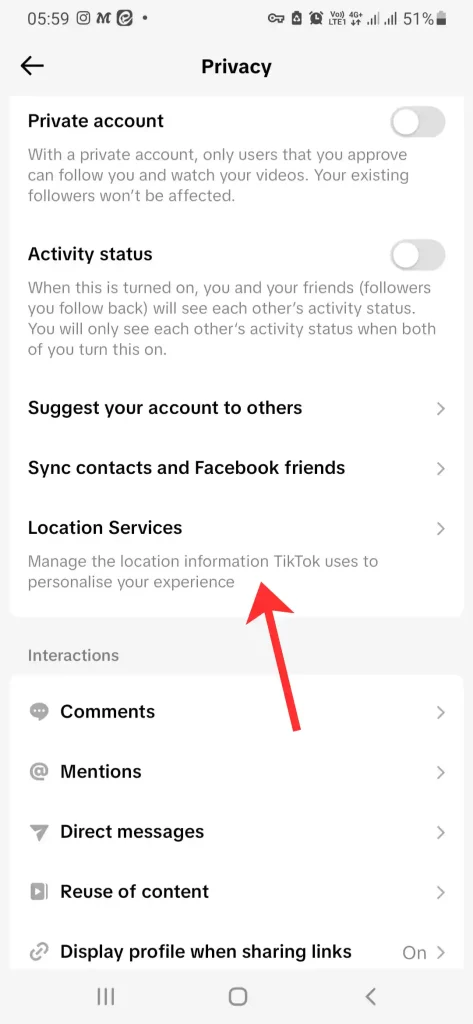
- Go to your Profile → Settings and Privacy.
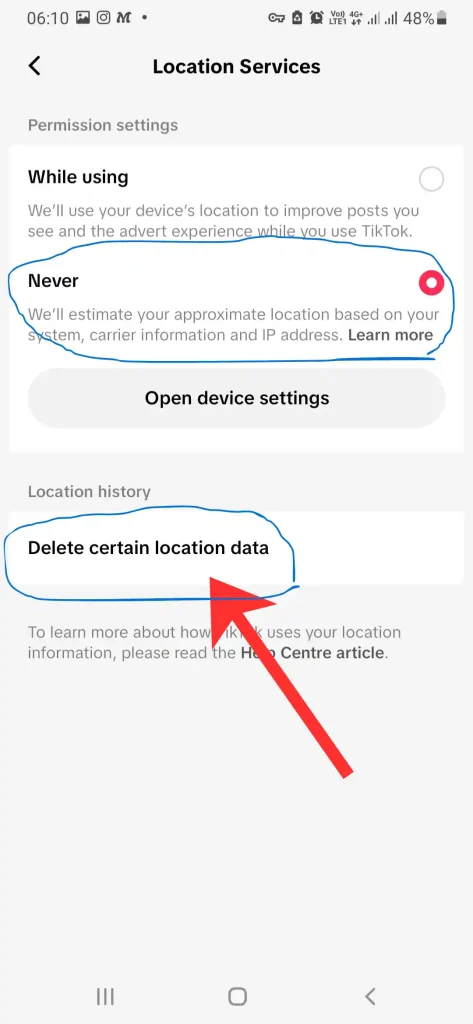
- Tap Privacy → Location Services.
- Check Never.
- Tap on the Delete certain location Data to remove all before saved Data.
You can also manage device-level permissions:
- iOS: Settings → TikTok → Location → Choose Never or While Using the App.
- Android: Settings → Apps → TikTok → Permissions → Location → Deny or Use App Control.
Who Can Access the Precise Location Feature?
- Only users 18+ can enable precise location.
- When enabled, TikTok shows an on-screen indicator whenever the location is accessed.
- All data is handled in the secure environment of TikTok USDS JV.
This ensures both transparency and compliance with U.S. privacy standards.
Is TikTok Safe to Use After the Update?
Yes. The 2026 privacy updates aim to enhance safety by:
- Limiting precise location access by default.
- Making location consent optional and transparent.
- Following legal frameworks such as the CCPA.
Users can maintain full control over their privacy settings and monitor any feature that uses sensitive information.
How to Review Your TikTok Privacy Settings Regularly
- Open TikTok → Profile → Settings → Privacy.
- Check Personalization & Data for all consented data uses.
- Review Location Services in your device settings.
- Update preferences anytime to reflect your privacy comfort level.
Regularly reviewing your settings ensures you remain in control and can respond to future feature changes.
Conclusion
TikTok’s 2026 privacy update prioritizes user control and transparency, especially around precise location tracking. By understanding these changes and adjusting your settings, you can enjoy TikTok safely while protecting your personal information.
TopQLearn Editorial Team
Expert Analysis & Educational Content

![TikTok's Discover List 2026: [Everything You Need to Know]](https://topqlearn.com/wp-content/uploads/2026/02/tiktoks-discover-list-2026-everything-you-need-to-know.webp)