
In less than 95 seconds, you will learn exactly how to access the TikTok feed on any device without downloading the application, including the “Category Skip” trick to bypass login pop-ups on your computer.
Quick Answer: To watch TikTok without the app, visit tiktok.com on a desktop or mobile browser. You can browse the “For You” page or use the top-left sidebar to search for specific creators. When a login pop-up appears, you can either select your favorite video categories to filter the feed or hit the “Skip” button to continue watching random videos anonymously.
The Anonymous Browsing Logic
TikTok allows web users to consume content without an account, but it uses browser cookies to track your behavior. In practice, if you want to view TikTok anonymously without the platform recording your interests for future suggestions, you must use Incognito/Private Mode. In regular mode, TikTok still logs which videos you stop to watch to refine your web feed.
Methods to View TikTok Without the App
1. Desktop Web Navigation (PC/Mac)
The desktop experience is the most feature-rich way to stay “app-free.”
- Navigate to www.tiktok.com.
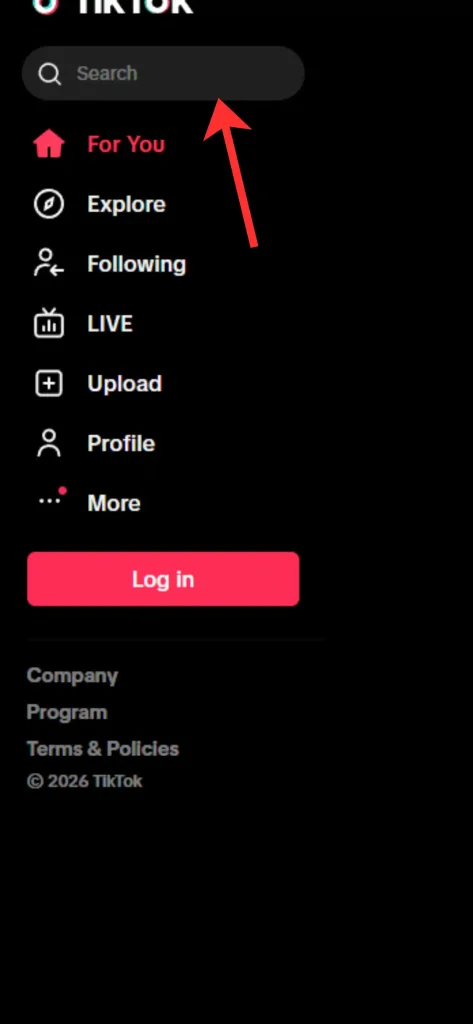
- Search: Use the sidebar menu on the top-left to type the name of a creator or a specific video topic.
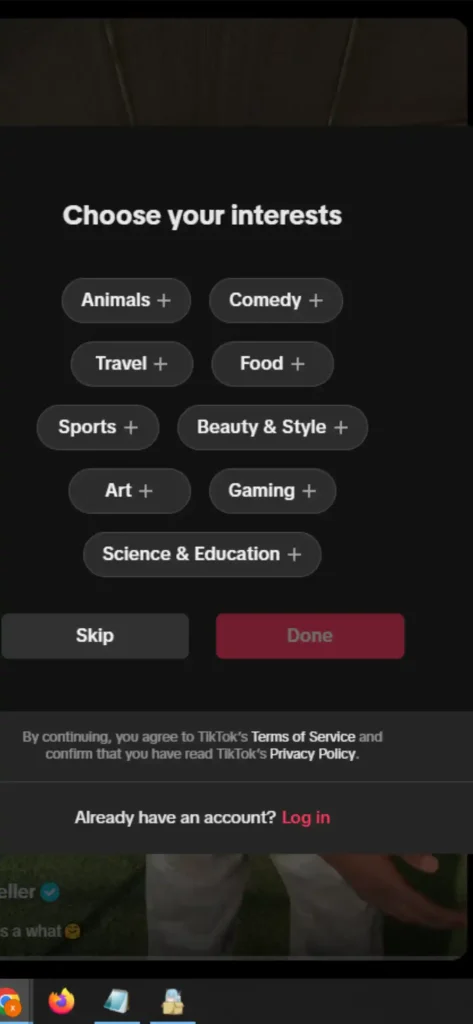
- The Login Pop-up Fix: After scrolling through a few videos, a window will prompt you to log in. You have two choices to stay anonymous:
- Select Categories: Choose topics you like (e.g., Cooking, Tech) and click “Done” to see a curated feed.
- Skip: Click the “Skip” button at the top of the pop-up to return to a random, non-filtered “For You” feed.
2. Mobile Browser “Desktop Trick”
Mobile browsers often force a redirect to the App Store. To stay on the web:
- Open Chrome or Safari and go to tiktok.com.
- Enable “Request Desktop Site” in your browser settings.
- This bypasses the “Open in App” banners and gives you the full sidebar navigation.
3. Privacy Control: Incognito vs. Regular Mode
- Incognito/Private Mode: Use this if you want zero data footprint. TikTok will not remember what you watched, and your next session will start with a completely fresh, random feed.
- Regular Mode: Use this if you want TikTok to remember your “Web Behavior.” Even without logging in, the browser stores your preferences to show you more relevant content the next time you visit.
[Image: TikTok Web UI showing the sidebar search and the Login Skip button]
Important Limitation (Most Users Miss This)
- ⚠️ Restricted Interaction: You can watch videos, but you cannot like, comment, or send messages in TikTok Live chat without a verified account.
- ⚠️ The “Scroll Limit”: Occasionally, after a long session, TikTok may force a login to prevent bot scraping. Clearing your browser cache usually resets this limit.
- ⚠️ No Uploads: You cannot post a TikTok video via a mobile web browser; this remains an app-exclusive feature.
What Web Viewing Does NOT Support
- Draft Management: You cannot access or manage TikTok drafts on the web.
- Algorithm Syncing: If you find a video you love on the web while in Incognito mode, it will not show up on your phone’s app later.
Quick Decision Guide
- ✅ Use Incognito Web if: You want to watch a specific creator without it affecting your future TikTok algorithm.
- ✅ Use Regular Web if: You don’t want the app on your phone but still want a feed that “learns” your interests.
- ❌ Avoid Web if: You need to use AR filters, record duets, or join LIVE battles.
Final Summary: Watching TikTok without the app is easy via tiktok.com. By using the search sidebar and the “Skip” button on login prompts, you can maintain a high-quality viewing experience. Use Incognito mode for total privacy or regular mode to let the web-algorithm personalize your feed.
📅 Accuracy Check: Verified for February 2026. This reflects the latest TikTok Web UI and login-bypass behavior.
TopQLearn Editorial Team
Expert Analysis & Educational Content