
In less than 80 seconds, you will learn exactly how to transfer your virtual Diamond balance into real cash, including the critical withdrawal limits that prevent most users from accessing their funds.
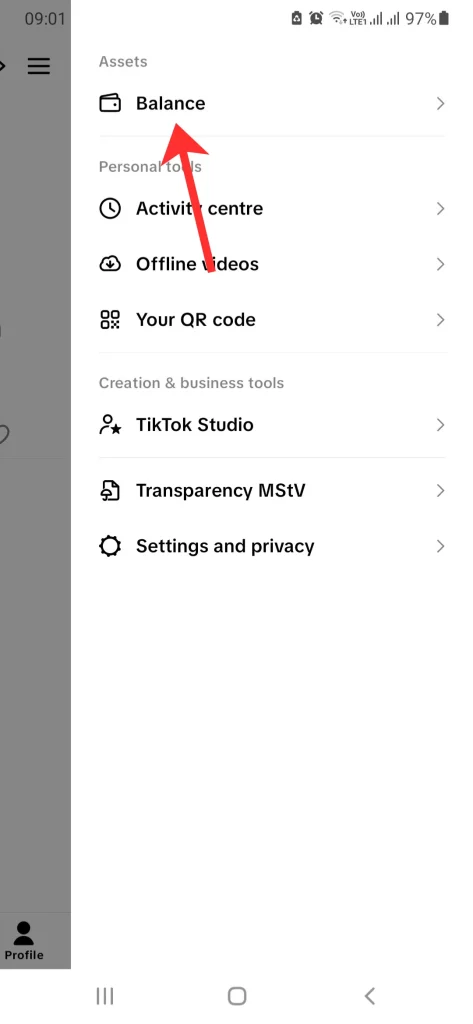
Quick Answer: To cash out, tap the three-line menu and select the Balance tab directly from the top of the menu screen. Inside, select Gift Revenue and tap Withdraw. While requirements vary, most regions require around $50–$100 equivalent before withdrawal becomes available. Your account must be linked to a verified PayPal or bank account.
Why Your Withdrawal Button Might Be Grayed Out
If you cannot tap the “Withdraw” button, it is likely because you haven’t reached your region’s minimum threshold or your Tax Information is incomplete. TikTok requires a “Clearance Period” to verify gifts before they are moved from “Total Assets” to “Withdrawable Balance.”
How to Withdraw Your TikTok Gift Revenue
Follow this lightning-fast 2026 UI path on TikTok version 43.7.3:
- Open TikTok and go to your Profile.
- Tap the three-line menu (hamburger icon) in the top right.
- Look at the top of the menu that appears: Tap the Balance tab (now located at the top, separate from settings).
- Select Gift Revenue.
- Tap the red Withdraw button.
- Select your linked payment method (PayPal or Bank Transfer).
- Enter the amount and confirm.
Requirements and Reality Signals
Before you can receive gifts on TikTok LIVE, you must understand the financial reality. Gift income is typically inconsistent and depends heavily on LIVE audience size and frequency.
In practice, TikTok coins worth is higher than the withdrawal value; creators receive only a portion of the original coin value after platform service deductions. To make money on TikTok sustainably, treat gifts as a bonus, not a fixed hourly wage.
Important Limitation (Most Users Miss This)
- ⚠️ System-Based Caps: There is a daily withdrawal limit that fluctuates based on your account’s standing and region.
- ⚠️ Policy-Based Holds: High-value transactions often undergo a manual review for security, which can take up to 21 business days.
- ⚠️ Tax Compliance: You cannot withdraw funds without submitting your tax details (e.g., W-9 for US) once you reach the platform’s earning threshold.
What This Withdrawal Does NOT Cover
- TikTok Shop Earnings: Revenue from selling on TikTok Shop is managed in the Seller Center, not the main Balance tab.
- Ad Revenue: Money earned via the Creator Rewards Program follows a fixed monthly payout schedule.
Quick Decision Guide
- ✅ Use PayPal if: You want faster processing (24–48 hours) for smaller amounts.
- ✅ Use Bank Transfer if: You are withdrawing large sums and want to avoid PayPal’s internal conversion fees.
- ❌ Avoid Frequent Small Withdrawals: Intermediary fees can eat into your profit if you don’t withdraw in bulk.
Final Summary: Cashing out involves using the new Balance tab at the top of the main menu and reaching the minimum Diamond threshold. Always ensure your payment methods are verified to prevent frozen transactions.
📅 Accuracy Check: Verified for February 2026. This article reflects the current 43.x.x UI for revenue management.
TopQLearn Editorial Team
Expert Analysis & Educational Content